sales@as203446.net

SmartMitigate

DDoS Protection

Filter attack traffic before it reaches your network. Use SmartMitigate on a SMARTNET connection, take a direct cross-connect, or protect infrastructure at another provider over GRE.
Network and data centre infrastructure

How SmartMitigate filters traffic

SmartMitigate inspects traffic on our network before forwarding it to you. We develop the eBPF/XDP filters ourselves and can investigate packet captures when an attack needs different handling.

The checks include SYN validation, TCP and UDP authentication, and filters that understand the protocols used by supported game and voice services.

Packet filtering
IPv4 and IPv6 filtering in the traffic path.
Attack reports
Attack history and packet samples in DELTA and through the REST API.
Filtering
TCP, UDP, ICMP, GRE and application-specific profiles.
Connection
BGP, GRE, cross-connect or direct SMARTNET network access.
Operations
Application-specific filters and NOC support.
<10 seconds Typical time to mitigate detected attacks.
1 Tbps / 1 Gpps Guaranteed mitigation baseline per customer.
IPv4 + IPv6 Network and transport-layer mitigation for dual-stack services.
24/7 inline Continuous inspection rather than emergency-only diversion.

Connection options

You can keep your equipment with its current provider and receive filtered traffic over GRE. If you are in a data centre where we can connect directly, a cross-connect is another option.

GRE tunnel

Protected GRE tunnel
260 € / month
  • BGP or static routing
  • IPv4 and IPv6
  • Redundant setup
  • /30 IPv4 and /128 IPv6
  • 1 Gbps 95/5 clean traffic included
  • 24/7 support
Request a quote

Cross-connect

Direct cross-connect
170 € / month
  • BGP or static routing
  • IPv4 and IPv6
  • Jumbo-frame ready
  • Redundant setup
  • 1, 10, 25 or 40G ports
  • Starting from 1 Gbps 95/5
  • 24/7 support
Request a quote

Other configurations

Multi-site and custom routing
Custom pricing
  • Routing and filter configuration
  • Routing policies for your network
  • Multiple locations or connection types
  • Larger networks or non-standard requirements
  • Technical support during setup
Request a quote

Filters for game and voice services

A game server and a voice server do not use the same packet formats or connection setup. SmartMitigate applies checks for the supported protocol, allowing the filter to make more specific decisions about the traffic.

For TCP applications, we recommend keeping protection active. Moving established connections onto a different route after an attack starts can interrupt them.

Permanent protection

Keep UDP and supported TCP traffic on the filtering path during normal operation as well as during an attack. This avoids changing the route when an attack begins.

Application-specific filters

If your application needs checks that an existing filter does not cover, speak to us about a custom filter. We will assess the additional development involved.

Source whitelisting

Allow known source prefixes through a whitelist. If one of those sources starts sending attack traffic, it may still be rate limited.

SmartRules

Set the filtering rules for your destination IPs and services in DELTA, without applying one policy to every service you run.

Attack reports in DELTA

Use DELTA to see when an attack started, inspect sampled packets and review how the filters handled it.
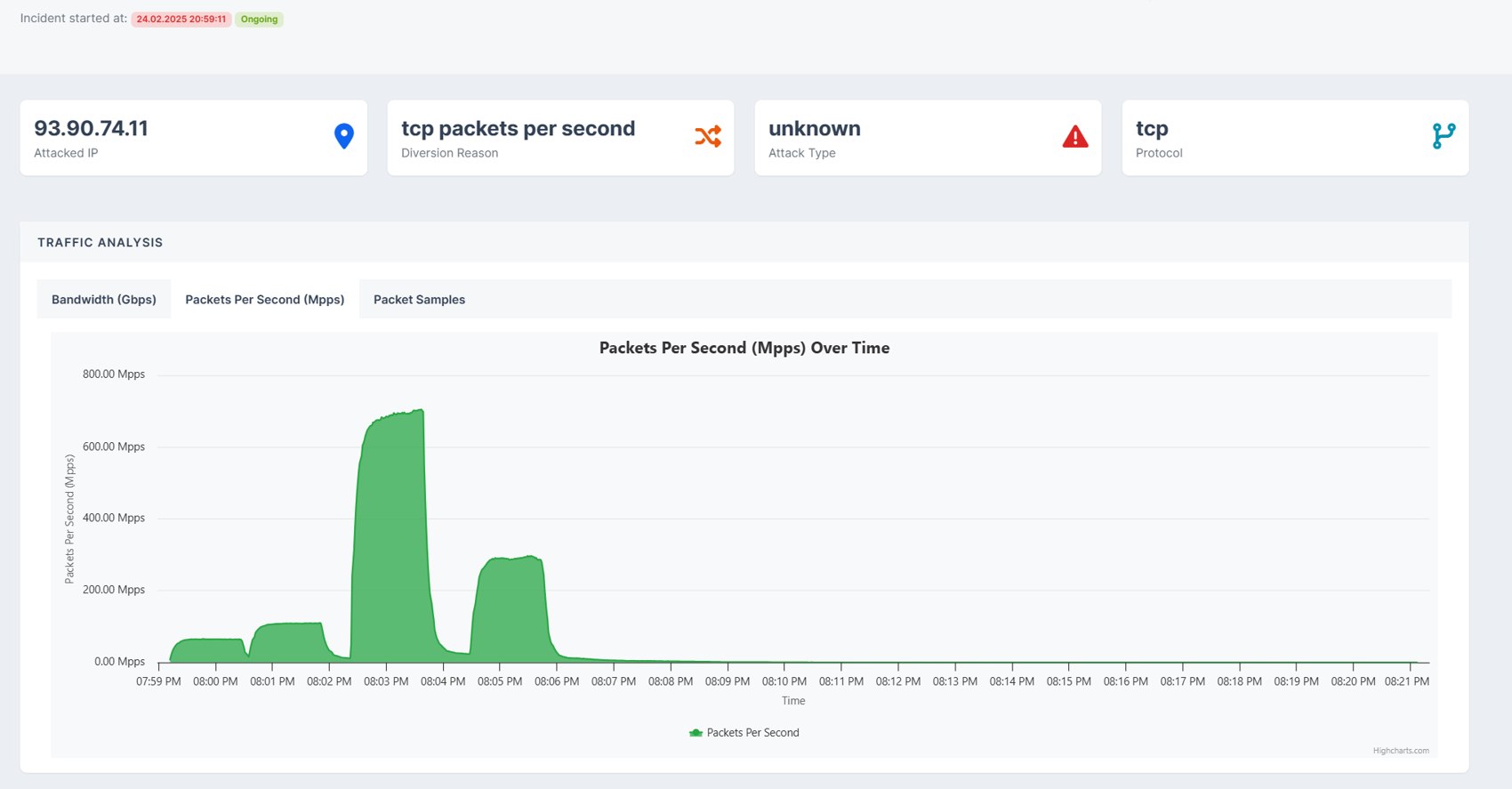
SMARTNET DDoS dashboard overview

Filter development

Packet captures help us investigate replay attacks and develop rules when we encounter a new attack pattern.
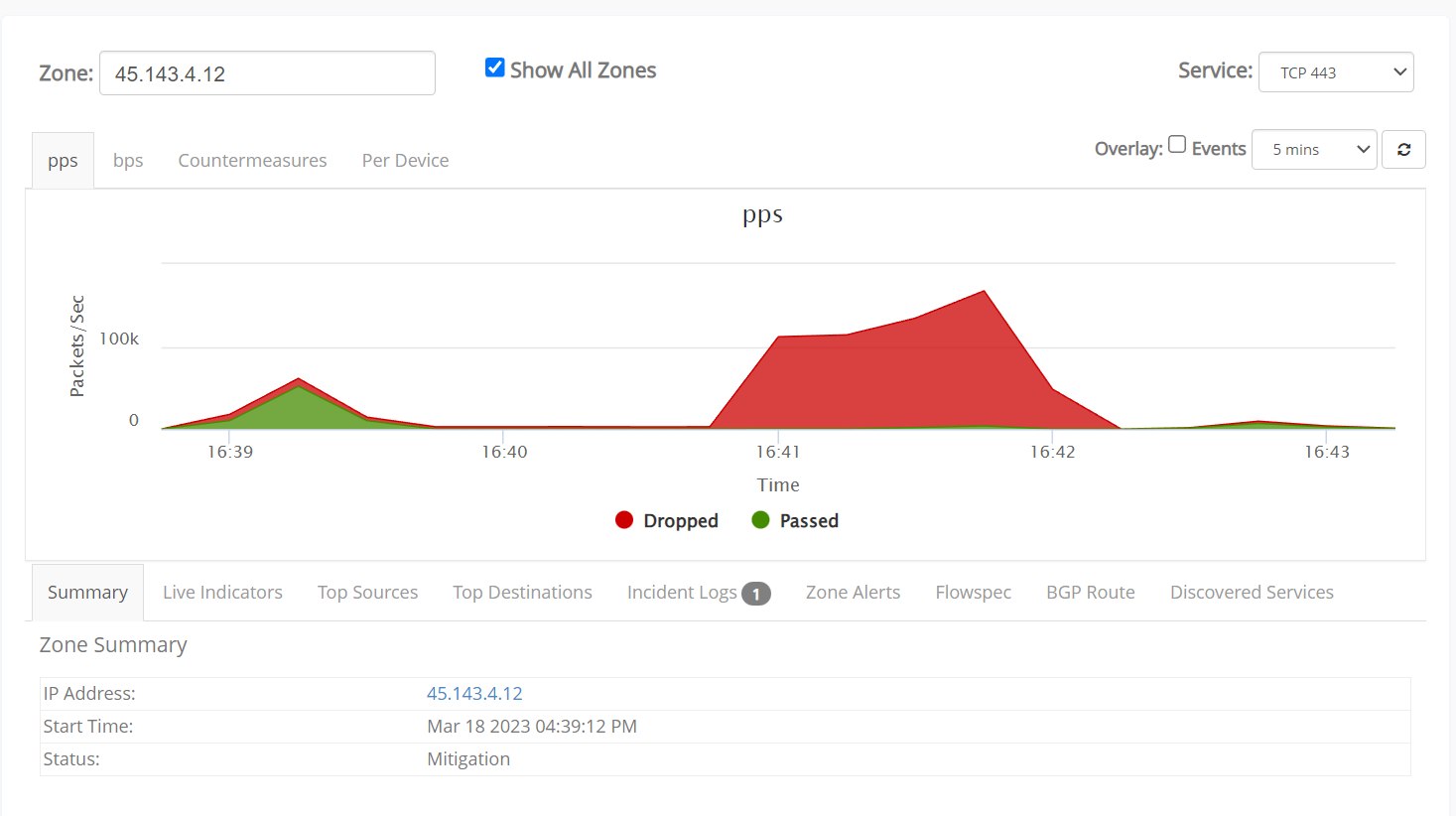
Filter analysis

Technical information

Mitigation platform

Inline processing

Traffic is inspected continuously without waiting for manual diversion.

Attack reports

Attack history, packet samples and filter actions via DELTA and the REST API.

Packet samples

Review captured packets when investigating an attack.

Multiple protocols

Coverage for TCP, UDP, ICMP, GRE and IPv6 traffic.

Game and voice

Profiles for TeamSpeak, FiveM, Minecraft, Source-engine traffic and other services.

Custom mitigation

Rules can match individual protocols, ports and services.

Covered traffic and limitations

This service filters network and transport-layer attacks. Bots and other abuse that resembles legitimate application traffic also need controls in the application or reverse proxy.

Supported attack types

  • IPv4 and IPv6 floods
  • UDP floods
  • TCP floods
  • ICMP floods
  • Other protocol floods
  • Resource exhaustion attacks
  • Amplification floods
  • PCAP replay attacks
  • Traffic patterns requiring additional filter rules

Not fully covered

  • Layer 7 HTTP and HTTPS floods
  • Application bot traffic such as Minecraft bots
  • Application logic abuse that resembles legitimate users

These attacks must be handled at the application or reverse-proxy layer rather than by the network mitigators.

Assigned service ranges

Use the listed port ranges for each application. Unrelated traffic on those ports can interfere with protocol-specific filtering.

UDP ranges

FiveM: 30000-32000 Factorio: 34100-34200 TeamSpeak 3: 9000-9999 Valve Source: 27000-28000 Minecraft Bedrock: 19100-19200 Palworld: 8200-8300 SCP SL: 7100-7200 Rust: 28015-28100 BeamMP: 40140 Hytale / QUIC: 5520-5620 OpenVPN: 1194-1294 WireGuard: 51820-51920

TCP ranges

FiveM: 30000-32000 Minecraft Java: 25565-26000 SSH: 22 HTTP: 80 HTTPS: 443

Permanent SmartMitigate ranges

UDP traffic and FiveM TCP traffic on ports 30000-32000 are currently routed through SmartMitigate permanently.

Default traffic handling

Some traffic classes are constrained during attacks to protect the affected service and the wider network.

Traffic that may be rate limited

  • TCP traffic
  • UDP traffic
  • DNS traffic per destination IP

Public resolvers such as 1.1.1.1, 8.8.8.8 and 9.9.9.9 receive higher priority during DNS-related attacks.

Blocked by default

  • IPv4 GRE traffic unless explicitly whitelisted
  • IP protocols other than 1, 4, 6 and 17, unless separately permitted

GRE and uncommon protocols require known source and destination pairs. GRE tunnels can be whitelisted through SmartRules.

Capacity

The service includes a guaranteed mitigation baseline. Additional attack traffic is handled when network capacity permits.

Included mitigation capacity

Up to 1 Tbps and 1 Gpps of mitigation capacity is included regardless of the monthly recurring charge.

Larger attacks

Larger attacks are not automatically blackholed. SMARTNET may request more information or propose a higher-capacity configuration.

Capacity limits

Capacity above the guaranteed baseline is not guaranteed. Traffic may be discarded if continued forwarding would affect network stability.

GRE tunnels

GRE connects remote networks. A direct cross-connect is preferable for game and voice services where latency matters.

MikroTik GRE is not recommended

Many MikroTik platforms cannot process high-rate GRE traffic reliably. SMARTNET does not provide support for MikroTik-based GRE endpoints.

Cross-continent GRE is not recommended

Endpoints outside Europe add latency and depend on the networks along the tunnel path.

Direct cross-connect

Game, voice and other latency-sensitive platforms should use a direct cross-connect where possible.

Service features
  • Time to mitigate under 10 seconds
  • Internal mitigation latency target below 0.2 ms
  • 95/5 billing based on traffic after mitigation
  • Portal and REST API attack reporting
  • BGP, GRE, Layer 1 and Layer 2 connectivity
  • Per-IP mitigation zones
  • Game protection for Minecraft, FiveM and Source-engine services
  • Voice protection for TeamSpeak and Mumble
  • UDP, TCP, GRE and ICMP coverage
  • Amplification pre-filters
  • Traffic anomaly detection
  • Custom BPF rules

DDoS protection questions

Is a lower-priced plan available?
No. The listed plans are our minimum monthly offers.
Can I add my own filter rules?
Yes. SmartRules in DELTA lets you change filtering for specific destination IPs and services.
Which SmartRule modes are supported?
Permanent SmartMitigate, rate-limit mode and UDP ephemeral-port filtering are currently supported.
When should permanent SmartMitigate be enabled?
It should be enabled for critical TCP services and high-risk target IPs. UDP traffic is already diverted through SmartMitigate by default.
Is Layer 7 HTTP(S) protection included?
No. Layer 7 HTTP and HTTPS attacks must be handled at the application, reverse-proxy or CDN layer.
Can GRE traffic be protected?
GRE can be whitelisted and protected, but a physical interconnect is preferred for latency-critical services.
Can customers test the service with attacks?
Excessive or continuous attack testing against rented address space is not permitted. Testing must be coordinated with SMARTNET in advance.
How do I report a network incident?
Open a ticket in DELTA with the affected service and when the problem began. Include MTR or WinMTR results when they help show the fault.